Pages

Sunday, May 29, 2011

How can I easily create a windows 7 boot disk?

new acer laptop (3 weeks old) froze up on him. He tried a ctrl alt del, when that did not work, he unplugged it. Now the pc wil not boot into windows. He gets to the screen where he can enter the BIOS or set up boot orger. The alt and taping the f10 did not work. Acer says they will mail recovery cds, as there seems to be an error with the OS and recovery partitions on the hard drive. It will take a week to get them. Son would rather have his pc working sooned, as sharing the 3 family computers with 6 other siblings means he does not have much computer time

In windows 7, can a boot cd be created, like in previous versions of windows? If so, how? I work at a pc helpdesk, but I am a phone tech, basic trouble shooting, so I wil need detailed instructions.

Friday, May 20, 2011

Microsoft investments and acquisitions


Microsoft has come along way since the days of Windows 1.0 and even Windows 95. It wouldn't have been possible to grow so substantially without making some heavy investments and buying up the perfect startup companies.
Over the years, Microsoft has made some important investments including: Apple Computers, BestBuy, Nextel Communications, and many Internet service providers. Investments play a key role in startup companies to further expand their ideas and improve software and hardware systems everywhere.
Microsoft has also made a lot of bold and strategic acquisitions of companies, including: Hotmail, Groove Networks, Rare, and of course their latest takeover, Skype. One of Microsoft's bigger purchases in the last few months has been Skype; an Internet phone software company that provides free calling from computer-to-computer, and even supported mobile devices running Skype.
The InfoGraphic, provided by Ripetungi, show just how many investments and acquisitions Microsoft has made over the past decade. The motive behind any acquisition is to further your own products and integrate them into your existing software or hardware. It will be interesting over the next few months to see where Microsoft is headed with their latest Skype purchase.

WP7: What to expect next week at the Mango event

Windows Phone 7 is due for a major update in the near future, and Microsoft is to take the wraps off of the consumer side of the update next week at two simultaneous events in London and New York, as well as other events in New Zealand and other countries.
Neowin will be covering the New Zealand and London events live, but in the meantime, here's a list of what we know, and what is expected to be announced:
Official announcements:
Rumors:
...And we're hearing about many more features on top of this. The news is exciting for early adopters and the prospects are looking good for the new platform. We're hoping Microsoft can deliver to the rumored September release deadline, rather than the end of the year.

WP7: Microsoft "inadvertedly" confirms "Mango" codename

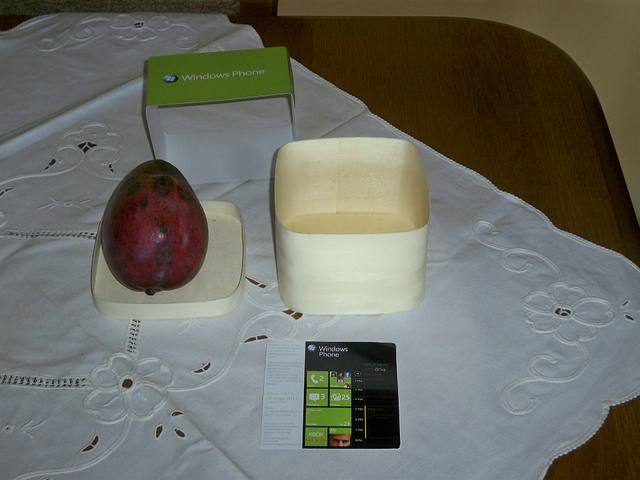
Microsoft is in the middle of sending out invites to their Windows Phone 7.5 "launch" events around the world to press members, but a Polish journalist got an interesting surprise in the mail this week.
In a somewhat unexpected move, Microsoft sent the journalist from WP-7 a package. Inside the package was an actual fresh mango, with an invite to the Polish version of the events we are seeing worldwide for the launch of the update to the platform. This essentially confirms the company's internal name for the update is "Mango," even though they have never confirmed it publicly. It will be interesting to see if that's the name the release will carry, or if it will carry the rumored title of "Windows Phone OS 7.5" until release.
Microsoft is planning on unveiling the new platform next week with two major events simultaneously in New York and London on May 24, and other events around the world. Neowin will be on the ground covering the event as it happens, so be sure to RSVP to our live coverage of the London and New Zealand events.

Microsoft Office Web Apps to officially support Chrome with Office 2010 Service Pack 1

Microsoft’s Office Web Apps — the Webified versions of Word, Excel, OneNote and PowerPoint — already work with Google’s Chrome browser. But as of the release of Service Pack 1 of Office 2010, they’ll be officially supported by Microsoft in Chrome.
That’s in the fine print of a May 16 post on the Office Sustained Engineering blog which provides an update on the first SP.
Microsoft already had said to expect Office 2010 and SharePoint 2010 Service Pack 1 to be released in final form by “mid summer” 2011. Today, the Softies tightened up that date a bit, saying that SP1 would be out by the end of June 2011.
Microsoft execs previously noted that SP1 will consist of cumulative and public updates to date for the various point products that are part of Office 2010 and SharePoint 2010. It also will include some other so-far unspecified fixes, which Microsoft officials said they’d detail between now and the time of the release. Products that will get fixes and updates include Office 2010 suites, Project 2010, Visio 2010, Office 2010 servers, Office Web Apps, Search Server 2010, SharePoint 2010 Products and FAST Search Server 2010 for SharePoint. Microsoft is planning to update all 40 SKU languages for Office when SP1 ships.
Microsoft began specifying some of the fixes that will be in Office 2010 SP1 in today’s blog post and simultaneously at the TechEd 2011 conference in Atlanta. On the “so-far-disclosed” list:
  • Outlook fixes an issue where “Snooze Time” would not reset between appointments.
  • The default behavior for PowerPoint “Use Presenter View” option changed to display the slide show on the secondary monitor.
  • Integrated community content in the Access Application Part Gallery.
  • Better alignment between Project Server and SharePoint Server browser support.
  • Improved backup / restore functionality for SharePoint Server
  • The Word Web Application extends printing support to “Edit Mode.”
  • Project Professional now synchronizes scheduled tasks with SharePoint task lists.
  • Internet Explorer 9 “Native” support for Office Web Applications and SharePoint
  • Office Web Applications Support for Chrome
  • Inserting Charts into Excel Workbooks using Excel Web Application
  • Support for searching PPSX files in Search Server
  • Visio Fixes scaling issues and arrowhead rendering errors with SVG export
  • Proofing Tools improve spelling suggestions in Canadian English, French, Swedish and European Portuguese.
  • Outlook Web Application Attachment Preview (with Exchange Online only)
  • Office client suites using “Add Remove Programs” Control Panel,  building on our work from Office 2007 SP2

Red Hat releases Enterprise Linux 6.1

Red Hat has released Red Hat Enterprise Linux (RHEL) 6.1 with numerous security updates and patches.
Red Hat released its popular RHEL 6 distribution back in November 2010 and typically the firm operates on a six month update schedule for current release tracks. So it is no big surprise that Red Hat has announced RHEL 6.1 in May, which brings out patches and security fixes and, according to Red Hat, maintains application compatibility and certification.
Aside from patches and updates, there are improvements to storage capabilities and file system updates, virtualisation, resource management and an updated scheduler all make the grade. RHEL 6.1 includes a technology preview of the firm's Enterprise Identity services, which are based on the open source FreeIPA project.
RHEL has almost become the default Linux distribution in many large enterprises. Although it doesn't have the cutting edge feel of other distributions, its conservative nature coupled with the cost and quality advantages of open source software have made Red Hat a significant software vendor that has over $1bn in annual revenue.
Many large server vendors also came out in support of RHEL, with IBM saying it worked with Red Hat closely to develop RHEL 6.1. Yesterday Red Hat became one of the founding members of the Open Virtualisation Alliance, a body set up to promote the virtues of Kernel-based Virtual Machine (KVM) technology.
Those who have an active subscription to Red Hat's support services can grab RHEL 6.1 from today.

Microsoft calls Intel's Windows 8 claims 'factually inaccurate' and 'misleading'

Microsoft has discounted claims made by a senior Intel executive that Windows 8 on ARM will not run older applications.
Renée James, SVP and GM of Intel's software and services group claimed that Microsoft's Windows 8 operating system for the ARM architecture won't be able to run older applications. The comments were made during a presentation at Intel's investor event. They flew in the face of Microsoft's claims and demonstrations that showed that it already had applications working on a very early beta of Windows 8 for ARM.
James also claimed there will be four versions of Windows 8 for ARM processors, adding that applications would not be compatible even across chip vendors. During James' presentation, she pointed out that Intel's architecture allows applications that run on Windows on the desktop to work seamlessly with Windows on any other Intel chip.
James' comments were startling to say the least. Microsoft demonstrated a very early beta of Windows 8 running on ARM-based chips at CES with applications such as Microsoft Word and Internet Explorer, and even emphasised how little work it had to do in order to get the operating system and applications working. Given that this was a very early beta, the swish demonstration was pretty impressive and it seems to discredit James' claims.
So it is no big surprise to learn that Microsoft has strongly contradicted Intel's claims in a fiery statement to The INQUIRER.
"Intel's statements during yesterday's Intel Investor Meeting about Microsoft's plans for the next version of Windows were factually inaccurate and unfortunately misleading. From the first demonstrations of Windows on SoC [system-on-chip], we have been clear about our goals and have emphasized that we are at the technology demonstration stage. As such, we have no further details or information at this time."
Intel might have a point if developers have to modify their code slightly if they want to run in a native Windows 8 ARM mode. However it is more than likely Microsoft will include some sort of virtual machine in order to maintain software compatibility, in the same way that Apple still allows code designed for PowerPC Macs to run on Macs that have Intel x86 chips.
Intel might have realised that it doesn't need to cosy up with Microsoft anymore. After all, the traditional desktop operating system seems to be making way for web browser based applications and the action in the IT industry seems to be moving from PCs to mobile devices. Of course Microsoft won't disappear overnight but it's safe to say that in the next few years the firm's decades old PC operating system model will be overtaken by operating systems that are primarily based on the Linux kernel.
So while James' comments might be surprising given Intel and Microsoft's close relationship, they could be motivated by the realisation that Microsoft simply doesn't have the pull, or the future, that it once did.

7 Best “New” Web Browsers With A Chance Against Chrome & Firefox

Many people swear by either Google Chrome or Mozilla Firefox, but there are a myriad of other new web browsers that are definitely worth a look. Truly, neither Chrome nor Firefox are perfect. There are some features we would like to see built into Firefox (that meanwhile, we’ll just have to satisfy with addons), and others that we still wonder why Chrome hasn’t bothered to include such as RSS feed detection (which meanwhile can also be satisfied with an add-on).
A lot of the following browsers ship with addons that you would otherwise have to obtain yourself, so they may make for a fresh breath of air.

Chromium [Cross-Platform]

Since Google Chrome is a fork of the open-source browser project, Chromium, anything that applies to Chromium can be applied to Google Chrome, while not everything that pertains to Chrome can be applied to Chromium.
For instance, to illustrate the very first point, both Chromium and Google Chrome offer Search Suggest, which presents you with a list of suggestions as you pause when you’re typing in your search query. An area where the two browsers differ is in crash reporting or usage statistics; by default, sending these reports is opt-in and disabled in Chromium. Chromium also comes without a PDF Viewer and Adobe Flash Player, but all is not lost since you can actually utilize any of the extensions in Chrome’s Web Store in Chromium.
Acquiring this browser takes a bit more than just finding the Download section and clicking on the installer link. You can follow these instructions here or you can use the unofficial, portable version on SourceForge.

new web browsers

Chromium-Based Browsers: SRWare Iron & RockMelt

SRWare Iron [Cross-Platform]

latest web browsers
If you like Google Chrome’s speed, but are concerned with privacy, SRWare’s Iron web browser might be for you. Since Google Chrome and SRWare Iron are based on the open source Chromium project, you’ll spot few differences. On the internal side of course, Iron doesn’t include Chrome’s information-collecting features, such as URL-tracker, error reporting, etc. Aside from those internal differences, Iron works pretty much the way you’re used to in Chrome. Chrome extensions and themes will also work on Iron, just like Chromium.
To check out the portable version and the regular install in Windows, head to the website. Mac users can download Iron here, while Linux users can go to this thread.

RockMelt 2 [Windows + Mac] + iPhone Sync

latest web browsers
If you’re big on sharing interesting news on Facebook, Twitter and/or email, RockMelt (in beta) might be worth a look. It’s similar to Flock, the social browser derived from Mozilla Firefox, in that it targets the die-hard social media addict so it integrates notifications from sites like Facebook and Twitter. It comes with a few tricks of its own though, the iPhone app [iTunes link], which syncs your items marked to read later, as well as bookmarks.
latest web browsers
Though RockMelt doesn’t support Google Sync, you can sync your RockMelt browsers across PCs and Macs with your Facebook account.

Wyzo 3 [Windows + Mac]

what new web browsers are there
A few things have changed since we last reviewed Mozilla-based Wyzo, but it remains the most useful browser for the frequent downloader since it comes with FireDownload, a download accelerator, and FireTorrent, an extension that turns this browser into a torrent client. One new feature in Wyzo 3 is the inclusion of SkipScreen, the extension that allows you to skip waiting screens from popular file-sharing sites, such as MegaUpload and the like, while it no longer seems to ship with CoolIris and FireGestures.

Maxthon 3.0 [Windows/Android]

what new web browsers are there
We first took a look at Maxthon in 2008, where we noted that Maxthon began as an extension of Internet Explorer and so, it uses the same rendering engine. These days, Maxthon supports both the Trident rendering engine (which is the layout engine for IE, so you can still view IE-optimized websites) as well as Webkit, which powers Google Chrome and Safari and renders Maxthon’s Ultra Mode, loading pages almost instantly.
In addition to its dual display engines, Maxthon also has a sea of nice features, such as mouse gestures, bookmark sync with Maxthon Passport, speed dial, popup blocker, online notepad, RSS reader, instant translator, screen capturing tools, and resource sniffer, which detects all video, image, and audio links on a website. The Android app also has a few of these features, namely the RSS reader, speed dial, download manager and gestures.

Opera 11 [Cross-Platform]

what new web browsers are there
In addition to extensions, Opera contains a few more impressive features that make it stand out from the crowd. With Opera, you don’t need another desktop mail program, torrent client, or web server, as Opera offers these services. Since Opera also offers browsers for mobile phones and tablets, you can use Opera Link to sync your bookmarks, speed dial, custom searches, etc. Opera users also get a free space on the My Opera community, that they can use as a blog or to share files.
One additional cool feature that we should mention is Tab Stack, which is one among many other tab management features Opera has, and can help you not only group tabs, but also streamline your workflow.

Internet Explorer 9 [Windows 7/Vista]

new web browsers
IE9 is heaps better than its predecessors, and sports a more minimalistic look, but perhaps the biggest feature it has over other browsers is, without a doubt, its integration with the Windows OS. Jumplists definitely take advantage of sites like Twitter and Facebook, which behave more like applications, and make some functions more seamless.


Google Is Serious, Chrome 13 Hides URL Bar

"A few months ago, we heard about Google playing with the idea of killing the URL bar in its Chrome browser. Chrome 13 provides a first view how this feature will work. There is a new flag and a context menu option that hides the traditional URL bar and moves a shortened version into each tab."

The Android Toolkit: 5 essential apps


I’m sure there will be some muttering along the lines of, “Oh, geez, not another software list article”. I tend to tune them out myself. The difference here is that I will be discussing applications that I use daily with my tablet.

File Manager

Possibly the most critical app in my kit is a file manager. I’ve used several since I first got an Android smartphone. I started with Astro File Manager from Metago, but I can no longer recommend it since the author seems to have abandoned it and will not respond to support emails. It works fine if you use Android 2.2 or lower; newer revisions have major compatibility issues that cause Astro to crash regularly.
I moved on to File Expert by Geeksoft. File Expert is a great app for file management, and has the ability to connect to a SMB-based network (Windows networking). This allows you to access your Windows file shares across the network and copy files to and from the server with your tablet. An added bonus is that File Expert also has a built-in FTP and HTTP server, so that you can access the tablet remotely.
File Expert does have some issues with running under Android 3.0 and higher. Recent revisions of the app will lock up the entire tablet requiring a hard reboot during any process that involves file copying or deleting. I have been working with the author to help get these issues resolved. He has been quite responsive to support and is willing to go the extra mile to fix bugs. Great service for a free app.
While I am waiting to help the author of File Expert to send me code to test, I have been using ES File Explorer from EStrongs. It is also an excellent, free file manager, with built-in SMB and FTP access. It’s solid and stable, but the interface isn’t as intuitive as File Expert. The clipboard is extraordinarily powerful, but it takes some figuring out. I definitely recommend it to Android 3.x users.

Security/Antivirus

Let’s face it, malware is going to be an issue no matter what platform you run. And there’s also the problem of losing your device by negligence or theft. I went through a number of options before I discovered Lookout Mobile Security.
I cant say enough good things about Lookout. The free version comes with anti-malware scanning, contacts backup, and remote location of missing devices. The premium version adds a comprehensive privacy advisor, additional data backup, remote wipe and lock, and premier support, for $3 a month or $30 a year. It allows you to cover two devices, which is great for someone like me with an Android tablet and an Android smartphone.

Instant Messenger

Pretty much everyone with a smartphone and a computer uses instant messaging. Your preferred chat client may be AIM, or Yahoo, or Google Talk or Facebook chat. Many people like me have accounts on multiple chat services. For years I have been using the Trillian IM client from Cerulean Studios, and I’m a paid member of the premium service.
Good news for Adnroid users, however. Just recently they released a new version of Trillian for Android, and have made it a free app. It works perfectly with Android 1.6 to Android 3.1+, and covers a wide array of instant messenger services.

Office Suite

Any business professional that travels a lot is going to want an office suite. If you work with formatted documents, spreadsheets and presentations, carrying a tablet with an office suite instead of a laptop makes it a lot easier for a traveling professional.
I can really only recommend two apps for this category. The first is the old granddad of mobile office suites, Documents To Go by Dataviz. The most mature of the available office suites, it has excellent document compatibility with the Microsoft Office suite applications, and cloud access to Google Docs. The pro version retails for $14.99.
I also recommend Quickoffice Pro. While it does not have all of the document formatting capabilities that are in Documents To Go, it is still a solid, dependable application. It has a wide assortment of cloud access, including Google Docs, Dropbox, Box.net, SugarSync and mobile.me. It retails for only $7.99, which makes it a really good deal for the capabilities it provides.

Backups

No toolkit would be complete without a comprehensive backup application. Fair warning: if you want to do a complete backup of your applications and data, you really need to consider rooting your device. Pretty much all of the available applications require root access.
There are numerous backup applications available, but the one that really strikes me as truly complete is Titanium Backup. Many times through my testing I have had to wipe and restore my android devices. Being able to do a complete backup of all of my installed apps plus the associated data has made the process a great deal easier–and I can take the backups and copy them to my server for safekeeping.
So what are YOUR must-have Android toolkit apps?

Kick off your day with ZDNet's daily e-mail newsletter. It's the freshest tech news and opinion, served hot. Get it.